
The cloud provides global unlimited compute to software applications, but what does this mean to Business Decision Makers and User Experience Practitioners? What customer insights can you derive from Azure for free?
A lot of software tools are available on cloud today as Software-as-a-Service (SaaS), and everyone can subscribe to use the software at a fraction of the cost. Eric Schaffer, CEO and Founder, Human Factors International, talks about Cloud UX – The Next Step in Institutionalization of Usability, where organizations could reduce duplicated research efforts with an unified UX research management tool built on cloud computing.
While tools are important to increase efficiency, businesses are interested to understand how customers are using their products and services, how customers are interacting with their apps and websites, and how better to predict trends or demands to improve their businesses. There are various quantitative and qualitative research methods available, and when they are used together, it would provide the best mix of customer insights.
At global scale, it might not be feasible to interview every customer. Quantitative research such as surveys and questionnaires, combined with Qualitative research such as focus groups, interviews, or contextual inquiry, could provide useful information for further analysis. Research methods such as A/B Testing or Multivariate Testing can be quantitative or qualitative. A trained UX researcher would be able to moderate a research to avoid bias that could skew results and send businesses down a path that would yield no or negative results!
App Modernization with Azure App Service
To modernize a web app hosted on-premises, simply start by migrating the site to the cloud. There are many benefits for moving to cloud, such as cost optimizations, global scalability, operation efficiency, etc.
Check for your website’s compatibility by assessing your website with the App Service Migration Assistant. If it is compatible, the Migration Assistant can migrate the site for you.
For a hands-on workshop on how to migrate a website to Azure App Service, please refer to Microsoft Cloud Workshop for App Modernization,
Cost of Website Migration – Free for Compatible Sites
Cost of App Service Hosting – Free for Shared Resources
Tracking Application Usage
Predicting business demand through opinions and guesswork, can be replaced by modern data analytics, artificial intelligence, and user research. The cloud provides the platform to understand application usage through instrumentation of your web apps, and tracking user metrics that you care about. For example, you can launch a pilot and invite beta users to test your products, or conduct A/B test to decide on the product feature to launch, or track user task efficiencies to optimize operations.
For an easy start, enable Codeless Monitoring. This does not require any development effort, as it would simply enable agent-based application monitoring for your applications on Azure App Service. Enable “recommended” collection level and other instrumentation options that you want to track.
If you have mobile apps integrated to the backend service, you can register your app on App Center, and integrate with Application Insights to start receiving telemetry.
Cost of Application Insights: Free for first 5GB/month
Cost of Metric Queries: Free for first million/month
Cost of Log Analytics: Free for 30 day retention
A/B Testing in Development
A/B testing does not have to start with production workload. If you only need to perform qualitative testing with a small sample of users to understand the merits between feature A or B, start with paper prototyping or Wizard of Oz prototyping, followed by low fidelity prototypes to higher fidelity ones. Jacob Nielson’s article explains Why You Only Need To Test With 5 users with each iteration of the design and Why You Need 40 Users for Quantitative Research.
Cost of Beta Testing – Token of appreciation for each user
A/B Testing in Production
For quantitative A/B testing in production, the cloud is capable of supporting tests from live inputs of all your customers! Whether you need to run tests with a small sample size, or all of your customers, it depends on your budget and how accurate you need the results to be. There are a lot of pitfalls in setting up A/B testing such as bias, and how problems can outweigh benefits. The best approach is still to have a mix use of research methods to understand the merits of A/B. Multivariate testing on the other hand, includes more variables and you need to understand how to vary the subjects to be tested to yield useful results, every combination of the variants multiply like rabbits!
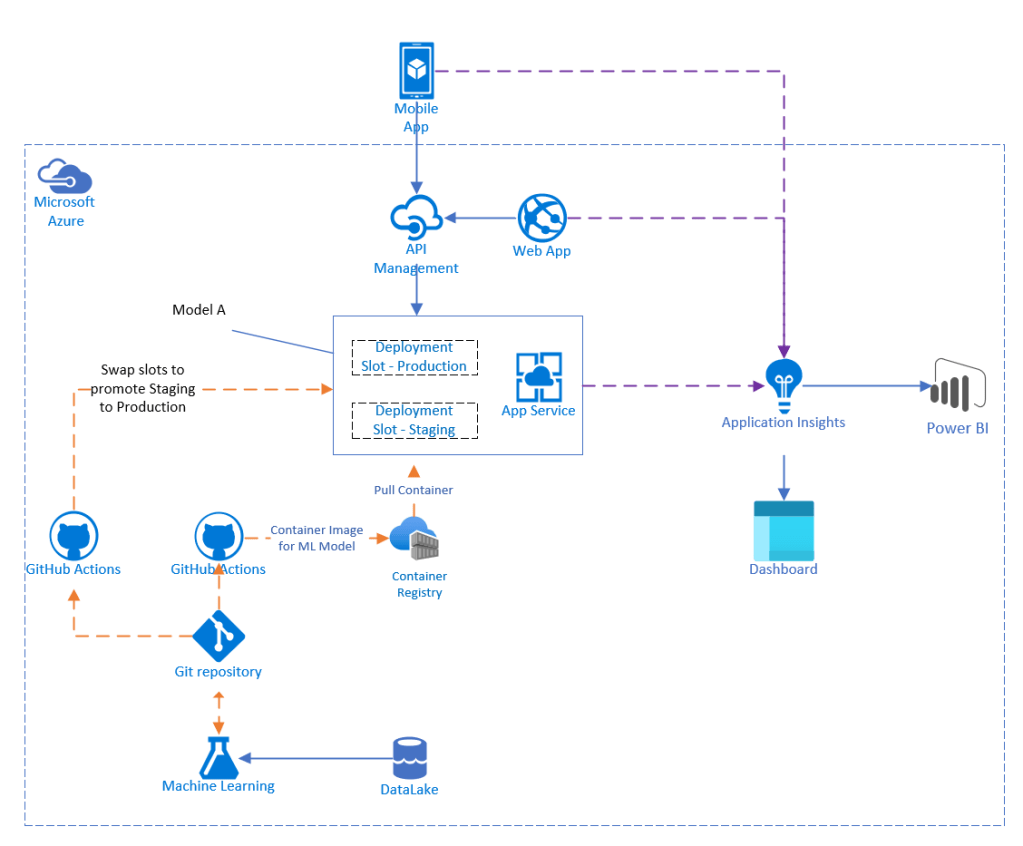
Note: The github repository for this is currently work in progress. If you have any feedback, please feel free to send me a message.
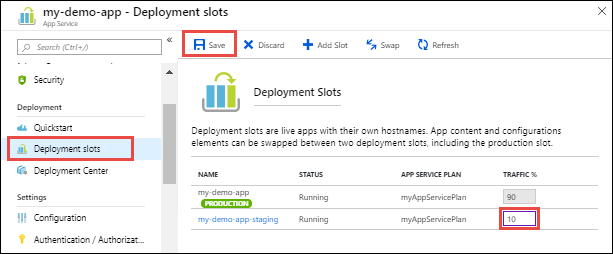
For A/B testing of web apps on App Service, you will need two versions of the apps to run, using deployment slots. As a Platform-As-A-Service (PaaS) service, you simply select a fraction of the traffic to be diverted to each of these slots.
A/B Testing with App Service, Part 1: Client-side configuration – Azure App Service
A/B Testing with App Service, Part 2: Server-side configuration – Azure App Service
For A/B testing of mobile apps, tests could be for understanding user preferences of different visual designs, interactions, options, task efficiency, and many more. It is important that the same user is always presented the same user interface. For example, User A will always use Design A, and User B will always use Design B. This is because, switching between UI designs is annoying, and users tend to be attached to the first design they like and can use successfully. The mobile app store will only approve one copy of the application, hence to switch between two different designs, the mobile app may include a personalization module, where it identifies the phone/tablet or the user that is logged in, and display the corresponding UI to be tested. By instrumenting your mobile app with Application Insights, you would have a single repository of insights for your entire system, which enables you to correlate logs and metrics.
Monitor mobile apps with Azure Monitor Application Insights – Azure Monitor | Microsoft Docs
For A/B testing of Machine Learning models, you can deploy different models into App Service deployment slots; this is currently in preview without support SLA, and is not recommended for production use. Then select to route the production traffic automatically to your deployment slots.
Cost of App Service – starts from $73/mth for standard tier
What to track for an Artificial Intelligence A/B test?
If you need the ability to log the scoring data used with your deployed model, or the results of scoring, you should instead deploy to Azure Kubernetes Service. Let’s first understand what can be tracked from customers usage.
A classification ML model would return Yes/No to a question, for example is this mail a spam? In such a case, a users’ opinion on the answer would be to validate the accuracy of the prediction. What if the user didn’t read the question right, or the user didn’t press the right button, these real-world usage scenarios does not indicate that your new model performed worse, but there are other variables at play during a live A/B test. While your new ML model has been trained and validated with large datasets in the lab, scored better in accuracy and predictions as compared to the previous one, the real world usually impose a more complicated view of accepting “artificially intelligent” ML models. A poorer score from validating with users could indicate other problems at play, and may not necessary be indicative of the accuracy of the lab-trained model. A follow up qualitative interview with some of your users would shed insights.
What about a regression ML model, for example predicting the price of houses in three months time. In such a case, a user would not be able to anticipate the future price to validate it’s accuracy. Your research questions could be revolving around the user experience such as rating how useful is the prediction or whether he would recommend this service to others. This serves as input to understand your customers better.
Let’s look at a recommendations ML model. For example your service recommends three different movie titles based on the movies he has watched. The accuracy of the ML model would be related to how often the user selects the recommendations, and whether the user likes your recommendations. These could be additional insights on how well your ML models work.
While there are a lot of different ML algorithms, the examples above serve as a reference on how to craft your A/B research experiment where it would be meaningful. It also illustrates the need to customize user research based on the ML models you are building.
For A/B testing of Machine Learning models with scoring data, you can publish models to Azure Kubernetes Service using canary deployment.
Cost of Azure Kubernetes Service – starts from $19/mth Compute Optimized vCPU, with 3 Year RI.
Analysis and Dashboard
After instrumenting your applications, you will be able to send telemetry to Application Insights for further analysis. To analyze the data, developers can run queries with Log Analytics. For business users, the results can be visualized and presented on Azure Dashboard using Workbooks.
Create custom dashboards in Azure Application Insights – Azure Monitor | Microsoft Docs
Cost of Azure Dashboard – Free
For more complex queries and powerful reporting you can use Power BI to connect to the Application Insights.
Application Insights Content Pack for Power BI | Azure Blog and Updates | Microsoft Azure
Cost of Power BI Desktop – Free
Summary
It is cost effective to derive customer insights with Azure for your mobile applications, websites, backend services, and machine learning models. There are many other tools available, but if you are looking to migrate your workloads to cloud, this will be a good starting point to understand your customer behaviors and preferences.
Disclaimer: This article is work in progress, and does not represent the organizations that I worked for. As there are frequent updates and improvements to Azure Services, the pricing and service capabilities may differ.
 Thoughts
One thought on “Data Driven Customer Insights with App Modernization on Azure”