
Introduction to Azure Well-Architected for AI Workload
AI is fundamentally transforming the business landscape by enhancing decision-making, automating tasks, and improving customer interactions. A well-architected framework is crucial for organizations to effectively leverage AI, ensuring robust data architecture, ethical considerations, and strategic integration. The Azure Well-Architected Framework for AI Workload (AWAF4AI) is designed to provide you with the guidelines and best practices necessary for designing and optimizing AI workloads, earning user trust on AI solutions. This framework focuses on key areas to ensure that your AI solutions are reliable, secure, efficient, cost-effective, and ethical.
Trust and Responsibility
At Microsoft, maintaining trust is paramount. Robust security measures are essential to protect customer data and privacy, which is the foundation of earning and maintaining trust. Initiatives like the Secure Future Initiative (SFI) emphasize principles such as “Secure by Design,” “Secure by Default,” and “Secure Operations” to ensure comprehensive protection. Through this initiative, Microsoft has significantly enhanced its cybersecurity measures by integrating AI-based defenses, improving software engineering practices, and advocating for stronger international norms to protect against cyber threats.
Key Differences from Azure Well-Architected Framework
While both the Azure Well-Architected Framework and the Azure Well-Architected Framework for AI Workload share similar goals, they focus on different aspects of architecture. The AI-specific framework addresses unique challenges such as model training, deployment, and lifecycle management.
| Azure Well-Architected Framework | Azure Well-Architected Framework for AI Workload | |
| Scope | Broader scope, applicable to all types of workloads on Azure | Specifically designed for AI workloads, addressing unique challenges such as model training, deployment, and lifecycle management |
| Security | Protecting workloads from attacks. | Protecting AI Models and data |
| Reliability | Ensuring uptime and recovery targets. | Ensuring AI models perform consistently. |
| Cost Optimization | Keeping spending within budget. | Optimize AI platform resource usage. |
| Operational Excellence | Reducing production issues | Using MLOps and GenAIOps for efficient management |
| Performance | Adjusting to demand changes | Ensuring models perform well under various conditions |
| Responsible AI | – | Ensuring fairness, transparency, and accountability |
AI Workload Reference Architecture
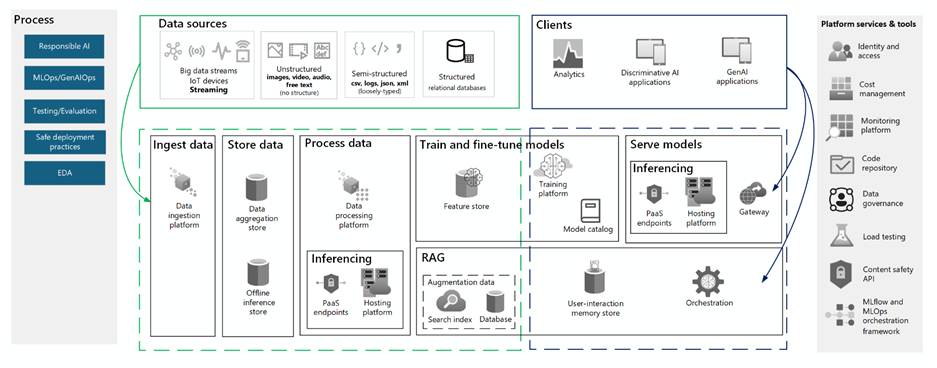
Logical components, processes, tools, and cloud services commonly found in an AI Workload are documented in the diagram below, refer to this architecture when assessing AI workloads.
Getting Started
This quick start guide is for you and teams to familiarize yourself with important AI concepts and get started. For deeper comprehension of this topic, explore AI workloads on Azure documentation to understand the architectural challenges and learn the design principles for AI workloads to effectively apply the AWAF4AI.
- Multi-Discipline Team: Ensure your team includes cloud architects, operators, and MLOps/GenAIOps engineers who are familiar with your AI workload’s architecture and cloud principles.
- Learn the Design Principles: Understand the design principles for each pillar and the top design considerations.
- Review the Assessment Questions: Apply the Azure Well-Architected Framework AI workload assessment on a real AI project or solution proposal. The assessment consists of 40 questions designed to evaluate your workload’s alignment with the Well-Architected pillars within 30minutes.
Design Principles
Learning the design principles first is crucial because it lays the foundation for creating effective and efficient AI solutions. By understanding these principles, you can apply the AWAF4AI workloads more effectively, addressing unique challenges such as model training, deployment, and lifecycle management.
Security
Earning user trust is fundamental. Protecting data at rest, in transit, and in use involves encrypting data throughout its lifecycle. Investing in robust access management ensures that only authorized individuals can access sensitive data and systems. Regular security testing and reducing the attack surface are crucial for maintaining security.
Reliability
Understanding your Service Level Agreements (SLAs) provides clear guidance on balancing reliability and costs. Conducting failure mode analysis and mitigating single points of failure early in the design stage reduces costs and ensures system reliability. Maintaining operational reliability with frequent updates and providing a reliable user experience are essential.
Cost Optimization
Identifying cost drivers such as data volume, queries, throughput, and indexing helps in optimizing costs. Paying for intended use and minimizing waste by monitoring utilization are key strategies. Optimizing operational costs includes updating models when necessary, deleting unused data, and automating processes.
Performance
Establishing performance benchmarks sets clear performance targets and expectations. Load testing ensures that the system can meet these targets under various conditions. Monitoring performance metrics and continuously improving benchmark performance are essential for maintaining optimal performance.
Operational Excellence
Fostering a continuous learning and experimentation mindset across teams is crucial for innovation. Minimizing operational burden with Platform-as-a-Service (PaaS) solutions streamlines management. Implementing automated monitoring systems for alerts, logging, and auditability ensures quick issue resolution. Safe deployments and continuously evaluating user feedback improve the overall user experience.
Top 10 Design Check List
While there are 40 questions in the assessment, there are 10 highly prioritized design considerations that your AI solution should include.
- Implementing Transparency in Responsible AI
- Enhancing user trust by providing user-facing information on data sources significantly boosts transparency. By exposing agent interactions, users gain confidence in the system’s operations, fostering a sense of reliability. Additionally, utilizing logs for tracking and error correction is crucial for maintaining system reliability.
- Solution References:
- Allow the users to ask and verify who has access to the content.
- Show the thought process of AI Agents on UX (Video: Analyst Agent in M365 Copilot)
- Implementing Security Controls in Responsible AI
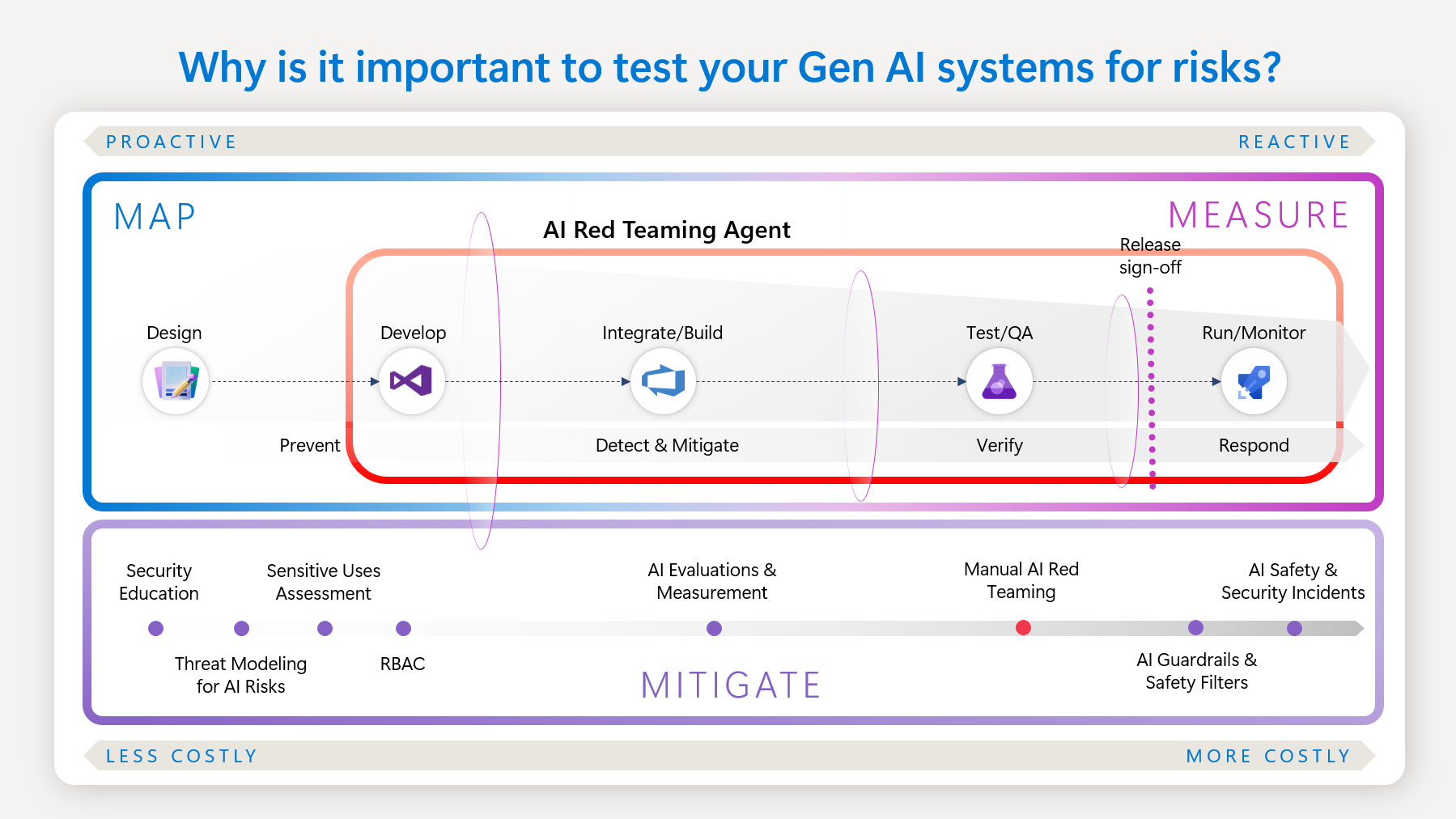
- Inspecting data to prevent attacks, filtering out inappropriate content, centralizing checks, and conducting multimodal inspections are essential for maintaining security. Additionally, sanitizing and filtering data to comply with privacy regulations and ensure adherence to legal and ethical standards is crucial. To implement these measures effectively, consider integrating automated data inspection and filtering tools such as Azure AI Content Safety and Azure Content Filtering into your security framework.
- Solution References:
- Choosing Best Hosting Platform for Apps
- Consider using PaaS for simplicity, as it streamlines management and reduces overhead. Supporting traceability and ensuring model version integrity are crucial for maintaining consistency and accountability. Applying high availability measures, determining private networking needs, and implementing robust identity and access controls are essential for ensuring system reliability and security.
- Solution References:
- Performance Considerations for App Platform
- Selecting the appropriate hosting platform depends on the batch or online inferencing method used. Understand performance benchmarks, there are cost tradeoffs for achieving performance. For predictable latency, serverless PaaS solutions are highly recommended. It’s important to be aware of service limits and quotas, and to combine multiple deployments to achieve fixed throughput and bursting capabilities for a more flexible compute, for example Azure Kubernetes Service.
- Related AI Platform Performance Options
- Key Considerations for Data Retention
- Reviewing data retention requirements is essential for ensuring compliance with regulations. Avoid unnecessary retraining unless there is evidence of model drift or a decrease in accuracy. Efficiently managing data deletion and duplication helps control costs and enhances security.
- Solution References:
- Define Grounding Index Maintenance Criteria
- Maintaining the grounding index involves updating it for new questions, using metadata to exclude outdated content, and removing personal data to ensure compliance and relevance. Additionally, maintaining forward compatibility and coordinating schema changes with code updates are crucial to prevent issues and ensure smooth operations.
- Solution References:
- Implement Security and Governance for Data Processing
- Defining security, privacy, and data residency requirements ensures compliance. Restricting access to sensitive workflows, implementing network security, and applying data classification measures protect data. Deployment automation streamlines processes and ensures secure deployments.
- Solution References:
- Implement Security for Data at Rest and in Transit
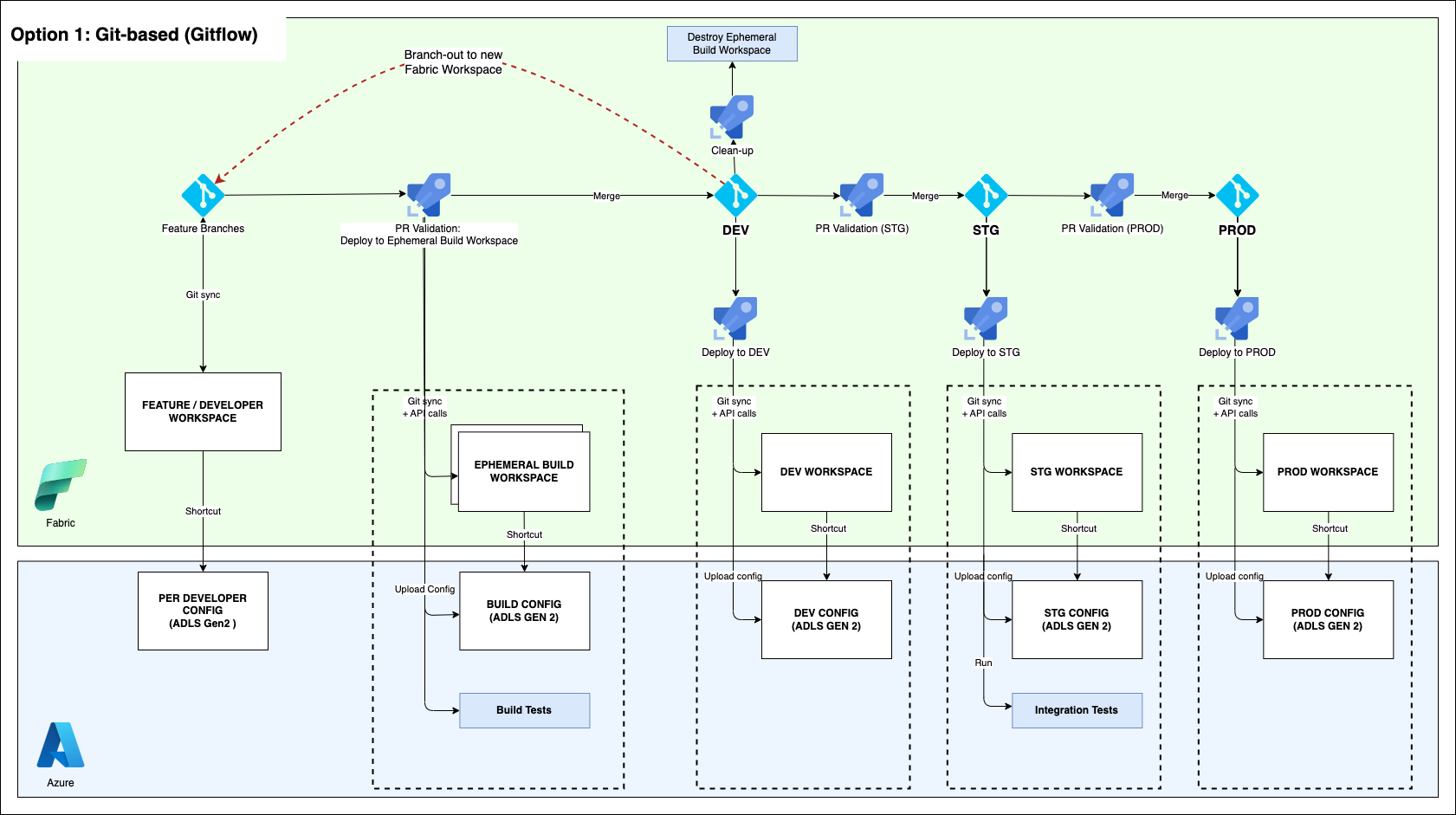
- Automating data pipelines (DataOps) ensures consistency and efficiency. Securing development and test environments to the same standards as production is crucial. Encrypting databases and transport layers protects data from unauthorized access.
- Solution References:
- Automate Model Evaluation as Part of Operations
- Automating model evaluation as part of operations is crucial for maintaining efficiency and accuracy. Integrate MLOps to manage code development effectively, using repeatable pipelines to track experiments and achieve desired accuracy. Track results by combining data, code, and parameters during each iteration. Additionally, integrate GenAIOps by evaluating existing models pretrained for specific use cases and iteratively refining them to ensure they are grounded in the specific domain.

- Solution References:
- Define Performance Metrics of your AI Model
- Utilize common success metrics such as accuracy, precision for classification models, Mean Absolute Error, Root Mean Squared Error for regression models, Groundedness, Relevance for fine-tuning pre-trained models, to evaluate and monitor performance. Leverage the built-in evaluation metrics in Azure AI Foundry for comprehensive insights. Additionally, establish custom evaluation flows to tailor the evaluation process to your specific application needs.
- Solution References:
What’s Next?
A hands-on approach helps you understand your AI solution. Run an assessment today, analyze your results, and prioritize remediations based on business impact.
References
AI workloads on Azure documentation
 Thoughts